







4 Experiments with Claude on Chrome
Over the past week, we used the Claude Chrome extension inside our day-to-day work to see whether it would actually make a difference. Rather than testing for speed or running artificial scenarios, we paid attention to something more subtle: whether having AI embedded directly in the workflow changes how attention moves, how analysis forms, and how decisions are made in real moments.
What the Claude Chrome Extension Is, and What It Promises
In late 2025, Anthropic launched the Claude Chrome extension, a browser-based version of its AI assistant that runs as a sidebar in Google Chrome. Unlike a traditional chatbot, the Claude Chrome extension can access and interact with the pages you visit. It reads web content, summarizes information, navigates tabs, fills forms, and automates repetitive tasks, all through natural language.
Its core promise is to reduce the friction that comes from constantly switching between tools, formats, and tabs. By embedding intelligence into the browser, it turns the assistant into an active participant in the user’s digital workflow, rather than something that operates outside of it.
What We Tried in Real Workflows:
- Team Meetings: Replacing Extraction with Discussion
Every week, the marketing team prepares for the Revenue L10 meeting by pulling performance data from multiple analytics dashboards to review what worked and what didn’t. We used this existing preparation process as a starting point to test the Claude Chrome extension and see how it could support a real team workflow.
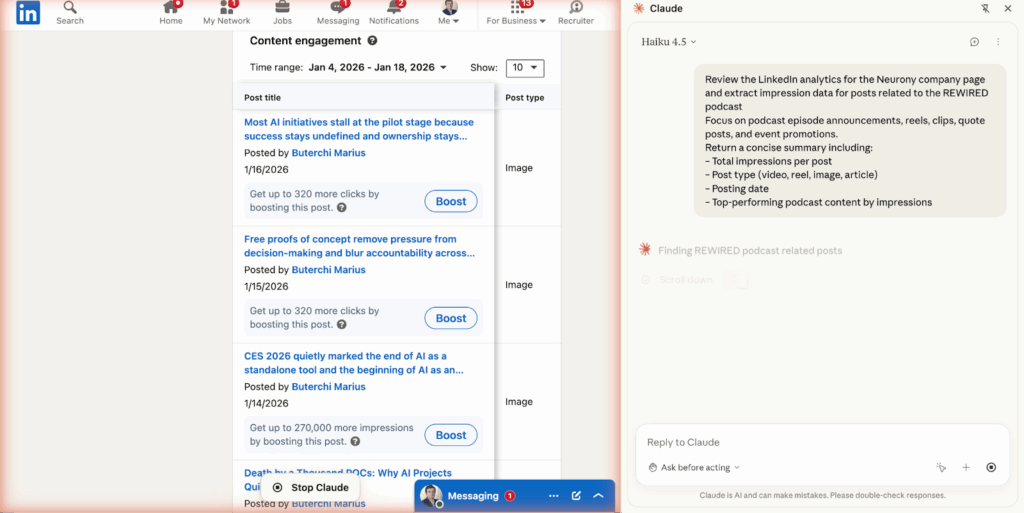
We gave Claude a prompt to review our LinkedIn analytics, break engagement down by post type, and factor in post context, not just the numbers. We also asked it to focus specifically on REWIRED podcast content, so we could compare engagement rates and use the data to guide what to improve next.
For a weekly workflow that’s usually manual, this was genuinely useful. Without leaving the browser, the Claude Chrome extension could scan the LinkedIn page, review engagement metrics across posts, interpret what each post was actually about, and produce a detailed summary we could use going into the meeting.
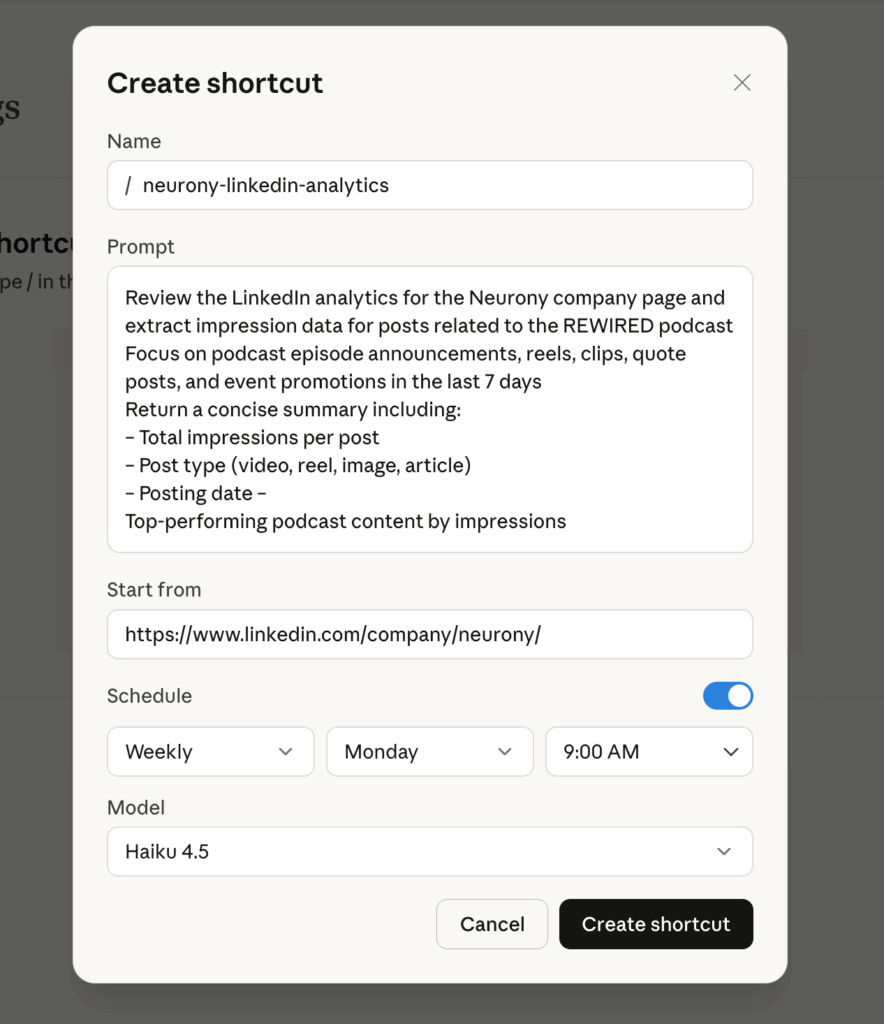
The Claude Chrome extension also allows prompts to be saved as shortcuts, so the same request doesn’t need to be repeated each time. The marketing team set one up to pull LinkedIn analytics from the Neurony company page on a weekly basis. It’s a small automation, but it removes just enough friction to make ongoing monitoring easier and more consistent.
In day-to-day work, automations like this matter because they remove small but recurring interruptions. Once a task is defined, it no longer competes for attention, which makes it easier to focus on analysis and decision-making.
- Frictionless Discovery: Signal Without the Scroll
Normally, we keep a close eye on a short list of people on LinkedIn -product leads, ecosystem operators, and a few founders who regularly post sharp updates or interesting shifts. In a busy week, with meetings and prep cycles taking priority, keeping up with those updates manually wasn’t realistic.
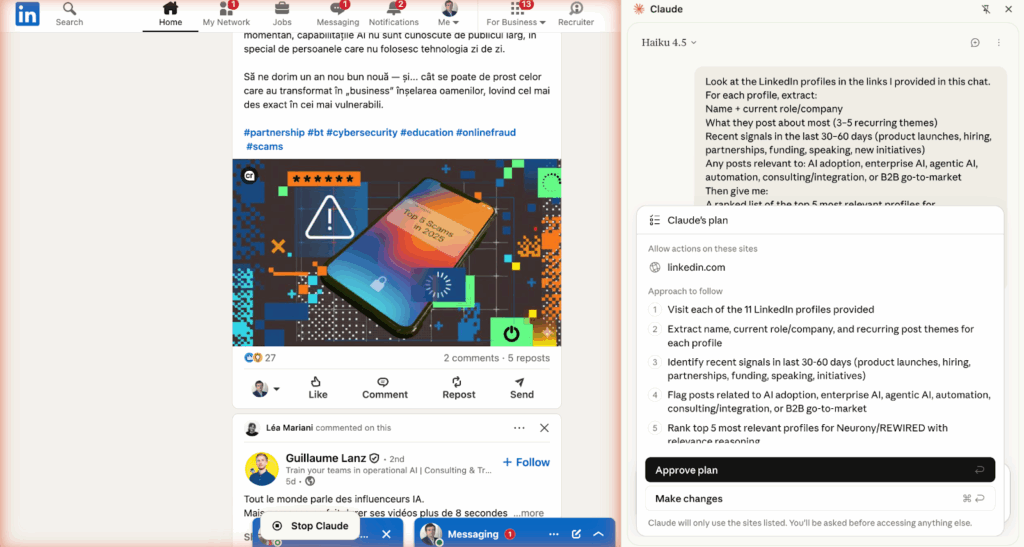
We asked the Claude Chrome extension to monitor updates from a selected group of these individuals, filter posts based on themes we were tracking, and summarize anything relevant in a short review. The goal wasn’t comprehensive coverage, but to maintain awareness without having to scroll.
For the most part, this worked well. The limitation showed up when we widened the scope. As the list of people being tracked expanded, some expected updates didn’t surface at all. In one case, a post from someone we closely follow for product signals was missing, while another summary focused on a tangential update that technically matched our keywords but didn’t materially matter.
Overall, this approach worked well for maintaining awareness without adding friction. We could skim the summary, save a couple of relevant items, and move on without breaking the flow of work or creating another task to manage.
- Another Way to Think About Discovery
As a separate experiment, we also tested using the Claude Chrome extension to follow a wider set of technology updates more mindfully. This experiment focused on discovery under constraint, situations where relevant information is available, but there isn’t enough time or attention to actively browse. Instead of trying to keep up manually, we wanted to see whether AI could help maintain orientation without turning discovery into another task.
We used the Claude Chrome extension to monitor updates from a selected set of sources, filter them by themes we were already tracking, and summarize anything relevant in a short review. The goal wasn’t full coverage or real-time tracking, but a lightweight way to surface potential signals without scrolling through feeds or opening more tabs.
Used this way, the value isn’t in consuming more information. It’s in maintaining a baseline sense of what’s shifting—enough to stay contextually aware without being pulled into constant monitoring or reactive reading.
- Operational Support: Delegating Coordination Without Losing Focus
Coordination tasks are usually the first things to slip when a day is already full, rescheduling a call, finding a free slot, or tracking down a link buried in an inbox. During one such moment, while preparing for a meeting, we realized a call needed to be moved.
Rather than breaking focus to handle it manually, we tried relying on the Claude Chrome extension the way we might lean on an assistant. We asked it to find the next available time and draft a short rescheduling note. We skimmed the message, made a small edit, and sent it without leaving the document we were working in.
As a one-off experiment, it worked quietly in the background. It removed a small interruption at a moment when attention was already stretched, nothing dramatic, but noticeably helpful.
Across all four experiments, the pattern was consistent. The Claude Chrome extension did not replace judgment or ownership, but it reduced the setup work that usually precedes them: scanning information, pulling data, coordinating logistics, and preparing context. That shift meant conversations started closer to the real issue instead of circling around inputs. The work did not become faster, but it became more focused and easier to sustain across a full day.
At the same time, its limits showed up around prioritization: without ongoing guidance, relevance could drift as scope expanded. There is also a trust consideration, without careful framing, it’s easy to place more trust in the output than it warrants, especially when it’s concise and well-structured.
There is, however, an important tradeoff. These tools require access to browser context, which introduces real risks around data exposure and overreach if not carefully scoped. Used without intention, they can create noise or misplaced trust. Used thoughtfully, they act as operational support that preserves focus while keeping accountability firmly with the leader.
AI, in this form, is not simply a chatbot. It points to a shift in how work happens when context and analysis begin to merge in real time.
We had fun testing this, not because of the tool itself, but because it raised a larger question: how intentionally are we designing the way context and analysis intersect in our work?